Build Desktop-Style Apps
In Your Browser
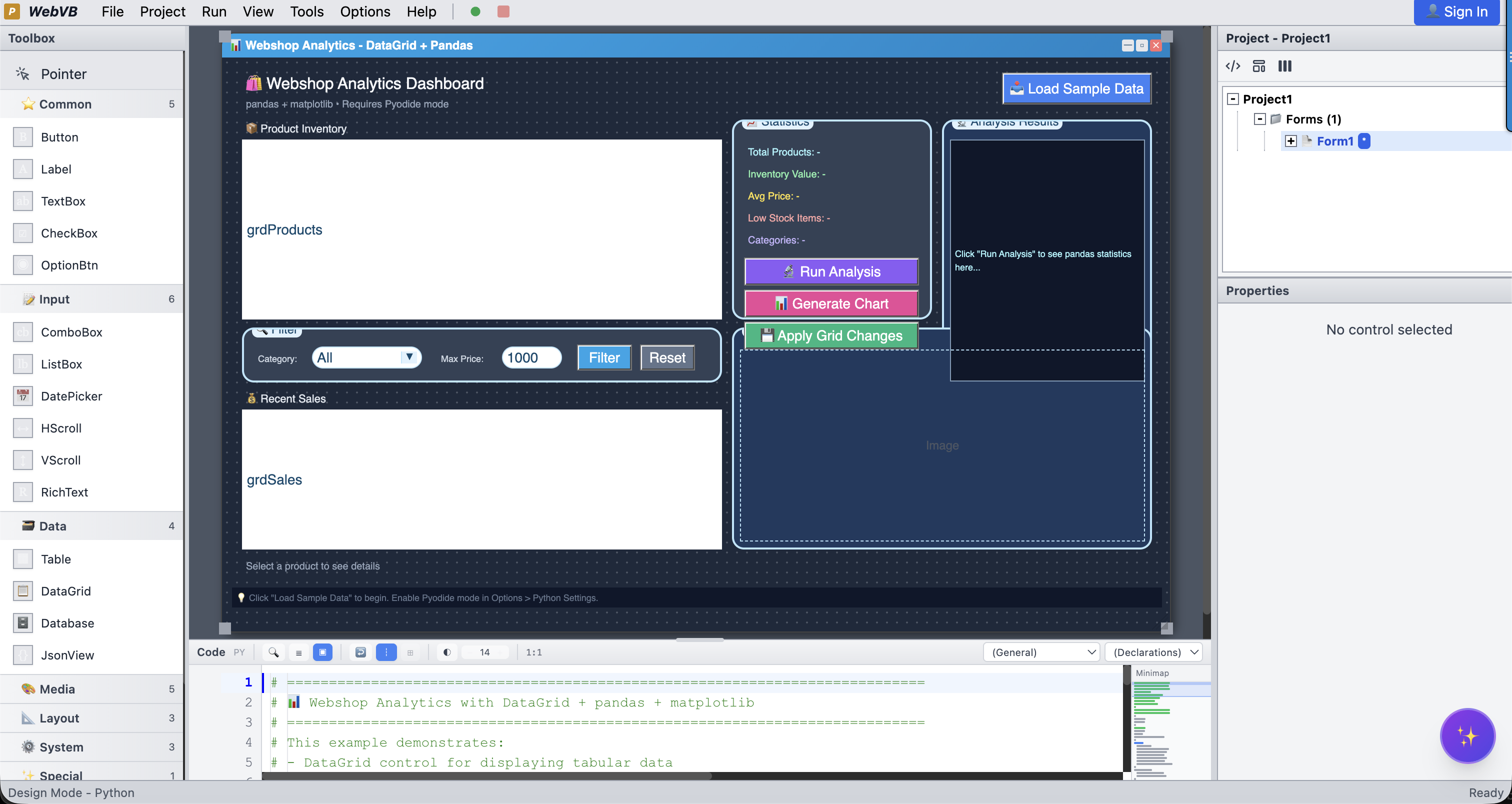
Everything You Need to Build Amazing Apps
A complete development environment with visual design, intelligent code editing, and instant execution.
Visual Form Designer
Drag and drop 25+ controls to build your interface. See changes in real-time. No HTML or CSS required.
Dual Language Support
Write code in classic Visual Basic 6 syntax or modern Python. Switch between languages at any time.
Instant Execution
Click Run and watch your app come to life. No compilation, no build steps, just instant feedback.
Zero Installation
Everything runs in your browser. Works on Windows, Mac, Linux, and Chromebooks. Nothing to install.
Export & Share
Export your app as a standalone HTML file or share via URL. Deploy anywhere in seconds.
AI-Powered
Built-in AI assistant helps you write code, debug issues, and learn new concepts.
25+ Built-in Controls
From simple buttons to complex data grids, WebVB Studio includes everything you need. Create custom UserControls to extend the library.
Experience the Magic
From idea to working app in minutes. Watch how easy it is to build with WebVB Studio.
' Simple Click Counter App
Private clickCount As Integer

Private Sub Form_Load()
    clickCount = 0
    lblCount.Caption = "Clicks: 0"
End Sub

Private Sub btnClick_Click()
    clickCount = clickCount + 1
    lblCount.Caption = "Clicks: " & clickCount

    ' Change color at milestones
    If clickCount Mod 10 = 0 Then
        lblCount.ForeColor = vbGreen
    Else
        lblCount.ForeColor = vbWhite
    End If
End Sub

Private Sub btnReset_Click()
    clickCount = 0
    lblCount.Caption = "Clicks: 0"
End SubData Science & Business Apps
Build powerful applications for data analysis, business automation, and machine learning—all with visual design.
Sales Dashboard
Interactive dashboard with Pandas DataFrames and Matplotlib charts. Filter, sort, and visualize your data in real-time.
import pandas as pd
import matplotlib.pyplot as plt

def Form_Load():
    # Load sales data
    df = pd.read_csv("sales.csv")
    DataGrid1.DataFrame = df

    # Create chart
    Chart1.plot(df["Month"], df["Revenue"])
    Chart1.title = "Monthly Revenue"

def btnFilter_Click():
    filtered = df[df["Region"] == ComboBox1.Text]
DataGrid1.DataFrame = filteredImage Processor
Process images with PIL/Pillow. Apply filters, resize, and save. Full Python power with a visual interface.
from PIL import Image, ImageFilter

def btnOpen_Click():
    img = Image.open(FileDialog1.FileName)
    Canvas1.draw_image(img, 0, 0)

def btnBlur_Click():
    img = current_image.filter(ImageFilter.BLUR)
    Canvas1.draw_image(img, 0, 0)

def btnGrayscale_Click():
    img = current_image.convert("L")
Canvas1.draw_image(img, 0, 0)Inventory Manager
Track inventory, manage stock levels, generate reports. Connect to your database or REST API.
Private Sub Form_Load()
    Database1.ConnectionString = "sqlite:inventory.db"
    Database1.Execute "SELECT * FROM products"
    DataGrid1.DataSource = Database1
End Sub

Private Sub btnAddStock_Click()
    Dim qty As Integer
    qty = Val(txtQuantity.Text)
    Database1.Execute "UPDATE products SET stock = stock + " & qty & _
        " WHERE id = " & DataGrid1.SelectedRow("id")
    RefreshGrid
End SubSurvey Analyzer
Import CSV survey data, calculate statistics, and visualize results with interactive charts.
import numpy as np
import pandas as pd

def btnAnalyze_Click():
    df = pd.read_csv(txtFile.Text)

    # Calculate statistics
    lblMean.Caption = f"Mean: {df['score'].mean():.2f}"
    lblStd.Caption = f"Std Dev: {df['score'].std():.2f}"
    lblMedian.Caption = f"Median: {df['score'].median()}"

    # Create histogram
    Chart1.histogram(df['score'], bins=10)
    Chart1.xlabel = "Score"
Chart1.ylabel = "Frequency"Customer CRM
Simple CRM to track customers, contacts, and interactions. REST API integration included.
Private Sub Form_Load()
    Inet1.URL = "https://api.example.com/customers"
    Inet1.Method = "GET"
    Inet1.Execute
End Sub

Private Sub Inet1_Complete()
    DataGrid1.DataSource = Inet1.ResponseJSON
End Sub

Private Sub btnSearch_Click()
    Dim results
    results = Filter(customers, txtSearch.Text)
    DataGrid1.DataSource = results
End SubML Prediction Demo
Build a simple ML prediction interface using scikit-learn. Train models and make predictions visually.
from sklearn.linear_model import LinearRegression
import numpy as np

model = LinearRegression()

def btnTrain_Click():
    X = np.array(DataGrid1.GetColumn("feature")).reshape(-1, 1)
    y = np.array(DataGrid1.GetColumn("target"))
    model.fit(X, y)
    lblStatus.Caption = "Model trained!"

def btnPredict_Click():
    x_new = float(txtInput.Text)
    prediction = model.predict([[x_new]])
lblResult.Caption = f"Prediction: {prediction[0]:.2f}"Learn by Example
Explore our collection of examples covering everything from basics to advanced integrations.
⭐ Featured Examples
DataGrid + Pandas
Webshop analytics with DataGrid, pandas, and matplotlib charts.
REST API Client
Connect to REST APIs - fetch, create, update and delete data.
Product Database
Persistent database with CRUD operations using Database control.
Bouncing Ball
Game loops, collision detection, and canvas rendering demo.
Webshop Demo
Full webshop with product catalog, shopping cart, and orders.
AI Assistant
AI-powered chat using Google Gemini and Workflow Designer.
All Examples
Calculator
A simple standard calculator with basic arithmetic operations.
To-Do List
Task manager with Add/Remove functionality using ListBox.
Guess Number
A simple high/low guessing game with random numbers.
Dice Roller
Random number generation and display with visual dice.
Pizza Order
Form with Options and Checkboxes calculating total price.
Interest Calc
Calculate simple and compound interest with inputs.
Invoice Calculator
Generate invoices with line items, tax calculation, and totals.
Age Calculator
Calculate age using DatePicker and Date math functions.
Color Mixer
RGB Color mixer using ScrollBars with live preview.
CSV Viewer
Parses CSV string data into a Grid control.
Sales Charts
Visualize data using the Chart control with multiple types.
DataGrid + Pandas
Webshop analytics with DataGrid, pandas, and matplotlib charts.
Mini Browser
Web Browser control and API fetching demo.
API Client
HTTP Requests with Headers and JSON parsing.
Inet Advanced
Full Inet demo: JSON, WebSocket, Queue, Cache, Download.
JSON Parser
Parse, query, and modify JSON objects visually.
REST API Client
Connect to REST APIs - fetch, create, update and delete data.
Contact Manager
CRM-style contact management using the Rolodex control.
Product Database
Persistent database with CRUD operations using Database control.
SQLite Database
Full SQL support with SQLite - tables, queries, and data management.
Sales Report
Generate printable reports programmatically.
Grouped Report
Advanced report with grouping, filtering, and HTML export.
WebShop Report
Product analytics with Sum, Avg, Median, StDev expressions.
Timer & Clock
Digital clock and stopwatch using Timer controls.
Image Viewer
Load images from URLs into Image control.
Notepad
Read and Write files to local virtual storage.
String Functions
Test all VB6 string manipulation functions.
Bouncing Ball
Game loops, collision detection, and canvas rendering demo.
UserControl Demo
Create custom UserControls with properties, methods, and events.
Webshop Demo
Full webshop with product catalog, shopping cart, and orders.
AI Assistant
AI-powered chat using Google Gemini and Workflow Designer.
Built for Everyone
Whether you're learning to code or building tools for yourself, WebVB Studio adapts to your needs.
Your First App in 5 Minutes
Learning to code? WebVB Studio makes programming visual and fun. See your code come to life with every change. No complex setup, no confusing tools.
- Visual drag-and-drop interface
- Instant feedback on every change
- Simple, readable syntax
- Built-in AI helper for guidance
"I built my first calculator in under 10 minutes!"
Visualize Data Instantly
Build interactive data dashboards with Python, Pandas, and Matplotlib. Create visual interfaces for your analysis without wrestling with web frameworks.
- Pandas DataFrame integration
- Matplotlib charts built-in
- Interactive DataGrid control
- Connect to REST APIs & databases
"Finally, a GUI for my Python scripts without Flask hassle."
Python with a Visual GUI
Love Python but hate building UIs? WebVB Studio runs full Python via Pyodide (WebAssembly). Drag controls, write Python, ship desktop-style apps.
- Full Python via WebAssembly
- NumPy, Pandas, Matplotlib
- Event-driven GUI programming
- No Tkinter/PyQt complexity
"It's like Tkinter meets the browser, but actually pleasant."
Teach Without Setup Headaches
Works on any device with a browser, including school Chromebooks. Students see immediate results without installation complexities.
- No installation required
- Works on Chromebooks
- Share projects via URL
- Simple debugging tools
"My students actually enjoy programming now."
Internal Tools Without IT Tickets
Build custom business applications, admin dashboards, and internal tools. Connect to databases and REST APIs. Deploy instantly, no DevOps required.
- Database & REST API integration
- Forms, tables, and reports
- Export deployable backend code
- Share via URL or standalone HTML
"We replaced 3 spreadsheets with one internal app in a day."
Remember When Coding Was Fun?
Miss the simplicity of Visual Basic? WebVB brings it back with modern capabilities. Build tools for yourself without learning React, Vue, or Angular.
- Familiar VB6 syntax
- Event-driven programming
- Classic form designer
- Export to standalone apps
"It's like 1998 again, but better."
From Idea to Demo in Minutes
Need a quick demo or proof of concept? Build functional applications in minutes, not days. Perfect for designers and product managers.
- Drag-and-drop design
- Instant preview mode
- One-click sharing
- Export as HTML
"I prototype ideas faster than I can explain them."
The Smart Choice
See how WebVB Studio compares to traditional development environments.
| Feature | | Traditional IDEs |
|---|---|---|
| Installation | None (browser-based) | Heavy installers |
| Platform Support | Any browser, any OS | Platform-specific |
| Learning Curve | VB6/Python simplicity | Complex modern frameworks |
| Visual Designer | Drag-and-drop | Varies by tool |
| Deployment | One-click export | Build systems required |
| Sharing | URL-based instant sharing | File transfers |
| AI Assistant | Built-in | Third-party integrations |
| Price | Free, Open Source | Often expensive licenses |
No compromises. Get the best of both worlds: classic simplicity with modern capabilities.
Up and Running in 4 Simple Steps
From zero to hero in under 5 minutes. No experience required.
Open WebVB Studio
Visit the app in your browser. No downloads, no installation, no account required.
Design Your Form
Drag controls from the toolbox onto your form. Arrange buttons, text boxes, labels, and more.
Write Your Code
Add event handlers in VB6 or Python. The AI assistant can help you get started.
Run & Share
Click Run to test your app instantly. Export as HTML or share via URL.
Your First App in 5 Lines
Here's a complete "Hello World" app. Just add a button to your form, double-click it, and paste this code.
Try It NowPrivate Sub btnHello_Click()
MsgBox "Hello, World!"
End SubReady to Start Building?
Join thousands of developers who've rediscovered the joy of visual programming. Your first app is just a few clicks away.